
Macro Controls and Re-Ranking
Rerank Selection
Section titled “Rerank Selection”Rerank and refresh the selected sounds for unlocked pads. AutoSamplr applies the current macro settings and selects a new set for the active layer without repeating stem separation.
- Lock pads before reranking if you want them to stay exactly as they are.
- The dice button is the random option: it asks AutoSamplr to choose a different offset in the ranked pool.
Global Macros
Section titled “Global Macros”The macro knobs steer what AutoSamplr chooses and how unlocked pads are shaped. Neutral knob positions leave the current behavior unchanged.
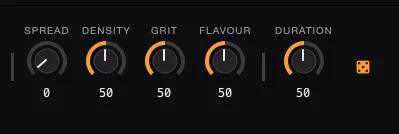
| Macro | Stem-separated layers | Mix layer |
|---|---|---|
| SPREAD | Moves from the strongest picks toward more adventurous alternatives. | The same, while preserving the requested loop/chop balance when enough candidates are available. |
| DENSITY | Changes how many picks can come from each musical group. | Moves from broad variety across timbral clusters to more picks from the strongest clusters. |
| GRIT | Moves from smoother slices to sharper, more biting slices. | Moves from smooth attacks to sharp, transient attacks. |
| FLAVOUR | On supported layers, moves from timbral variety to stronger transients. | Moves from unusual, novel timbres to representative, direct timbres. |
| DURATION | Rebuilds candidates at a shorter or longer target duration from the cached source analysis. | Moves from short chops to full-bar loops. |
Stem-layer DURATION can take longer than the other controls because it rebuilds candidate boundaries. It still uses the cached source analysis and does not repeat stem separation.
Mix Controls
Section titled “Mix Controls”With stem separation off, the Mix layer shows SPREAD / DENSITY / GRIT / FLAVOUR / DURATION. These controls change which source slices AutoSamplr selects; they do not add distortion, filtering, or other processing to the audio.
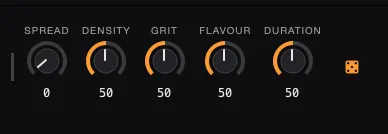
- DURATION is the only Mix control that changes the requested balance of loops and chops. It ranges from 0 loops and 16 chops at the far left to 16 loops and 0 chops at the far right. Its default midpoint aims for eight of each when the source provides enough candidates.
- DENSITY has four levels, requesting one to four picks per timbral category. Lower levels spread the result across more clusters; higher levels concentrate more picks in the strongest clusters.
- GRIT, FLAVOUR, and SPREAD steer the selection without changing the requested loop/chop balance. If one family does not have enough candidates, AutoSamplr fills the remaining pads from the other family.