
Editing, Trimming, and Per-Pad Controls
Trim and Slip
Section titled “Trim and Slip”- Right-click a populated pad to open the trim editor. On macOS, Control-click also works.
- Drag the start and end handles to adjust the playable region.
- Drag the highlighted selection left or right to slip it through the source without changing its length.
- Use Command+Z on macOS or Control+Z on Windows/Linux to undo the last slip.
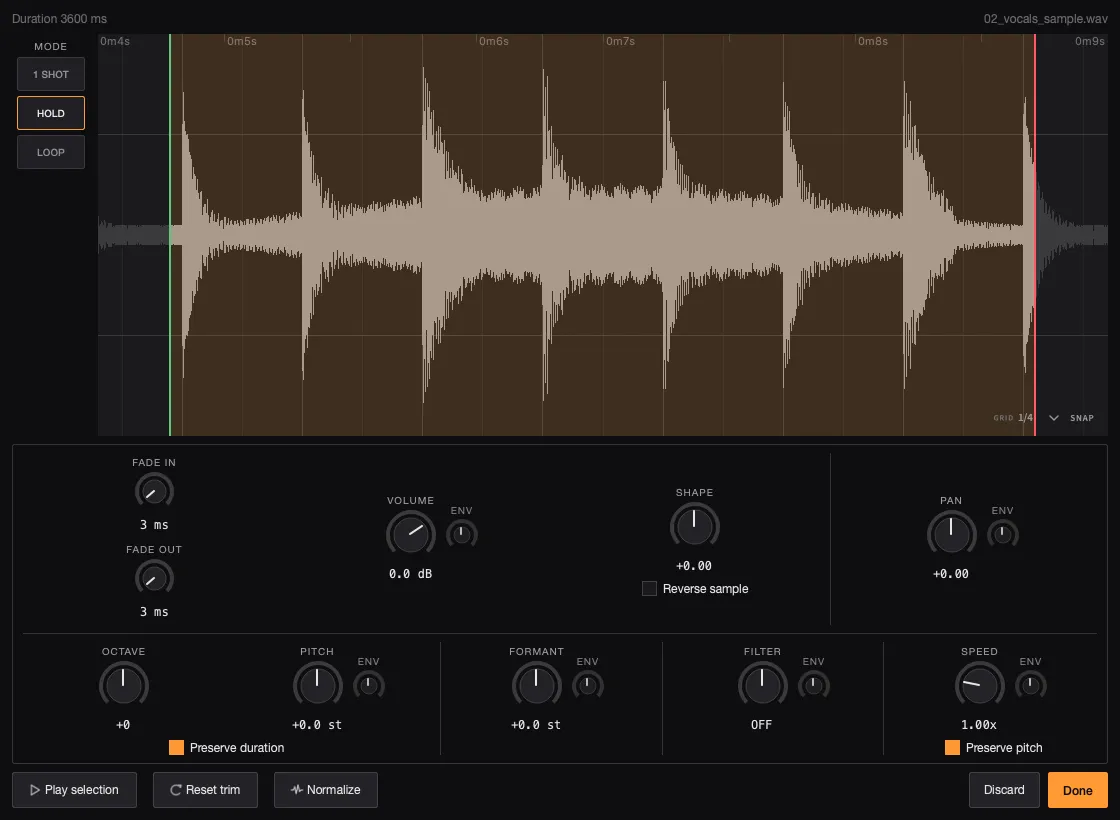
AutoSamplr shows a detected beat grid when timing is reliable and a time grid otherwise. Turn on SNAP and choose a division to snap later trim or slip drags. Hold Command on macOS or Alt on Windows during a trim-handle drag to temporarily invert the saved Snap setting.
Play the pad while editing to hear the current trim and controls. The playhead also follows successful keyboard and MIDI triggers.
Beat-Aware Trim Walkthrough
Section titled “Beat-Aware Trim Walkthrough”Watch AutoSamplr detect the beat grid, snap a trim, and slip the selected region.
Playback Mode
Section titled “Playback Mode”| Mode | Behavior |
|---|---|
| 1 Shot | Plays the complete pad; releasing the key or pad does not stop it. |
| Hold | Plays while held and stops on release. |
| Loop | Repeats while held and stops on release. |
Click an active Hold or Loop button again to return to 1 Shot.
Pad Controls
Section titled “Pad Controls”Adjust per-pad controls only when the raw chop needs shaping.
| Control | Use |
|---|---|
| Volume | Make the pad quieter or louder. |
| Pan | Move the pad left or right in stereo. |
| Shape | Make the attack punchier or softer. |
| Fade In | Smooth the start of the pad. |
| Fade Out | Smooth the end of the pad. |
| Pitch | Tune the pad up or down. |
| Octave | Shift pitch by whole octaves. |
| Formant | Shift the broad vocal or instrument body without moving the note: left lowers the formant, right raises it. |
| Filter | Left applies a low-pass filter that removes highs; right applies a high-pass filter that removes lows. |
| Speed | Slow down or speed up playback. |
| Preserve duration | Keep length steady when changing pitch or octave. |
| Preserve pitch | Keep pitch steady when changing speed. |
| Reverse | Play the sample backwards. |
ENV Automation
Section titled “ENV Automation”Volume, Pan, Pitch, Formant, Filter, and Speed each have a small ENV knob beside the main control. The main knob sets the pad’s base value; ENV adds a signed automation depth relative to that value. Leave ENV centered at zero for an exact bypass.
Moving an ENV knob away from zero creates a useful starting contour and shows that parameter’s orange envelope over the waveform. Positive and negative ENV values apply the contour in opposite directions from the base value.
Edit the visible envelope directly on the waveform:
- Drag a point to change its time and value.
- Drag a small midpoint handle to change the preceding segment’s curve.
- Hold Shift while dragging a point to lock its value, or Control to lock its time.
- Right-click the envelope to add or delete points, change the preceding segment, or assign D and S section markers.
Envelope changes preview with the rest of the pad edit. Choose Done to save them or Discard to cancel them.
Normalize updates the visible Volume control.
Choose Done to save the edit, or Discard to close without applying it.
To apply shared settings across several pads, see Multi-Edit Mode.