
Advanced Quality and Audio Models
Processing Mode
Section titled “Processing Mode”- Leave Stem Separation on to create separate layers. The selected Quality mode determines which layers are generated.
- Turn Stem Separation off to skip stem models. One source creates a hybrid Mix layer containing short chops and full-bar loops.
- With Stem Separation off, selecting several sources creates one intact layer per source in the same kit.
- To stem-separate several sources, use Batch Mode so each source produces a separate kit. Multiple sources cannot run together while Stem Separation is on.
On the Mix results screen, use the five independent macros to steer spread, density, attack, timbre, and the loop/chop balance. See Macro Controls and Re-Ranking.
Stem Separation Quality
Section titled “Stem Separation Quality”With Stem Separation on, choose a mode from Settings > Quality.
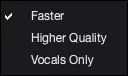
- Faster creates Drums, Bass, Vocals, Melody, and Misc layers and is recommended for most workflows.
- Higher Quality creates the same five layers and can sometimes improve separation, especially on vocals, but takes longer.
- Vocals Only creates Vocals, Vocals-Alt, and Instrumental layers, focusing the two sample banks on different vocal selections while preserving an instrumental bank.
Device
Section titled “Device”Keep Device on Auto unless you specifically want CPU, CUDA, or MPS.
| Device | Use when |
|---|---|
| CPU | Use the computer’s main processor. |
| CUDA | Use a supported NVIDIA GPU. |
| MPS | Use Apple Silicon graphics on a Mac. |
Audio Models
Section titled “Audio Models”- Use Settings > Install audio models when AutoSamplr asks for a missing optional model.
- The dialog can install, remove, or repair the optional models available in your build.
- If a run asks for audio models, install the requested models, then continue or run again.